Start Seedance 2.0 Mini from text
Describe the subject and its surroundings to Seedance 2.0 Mini, then add the movement. A concrete action makes it easier to decide whether the result fits the purpose of the shot.
ByteDance · Video generation
Turn a written idea or image into short video with Seedance 2.0 Mini. Create clips at 480p or 720p, with optional generated sound. Shape a focused scene in the Playground, review its current estimate and use the API to add that workflow to your application.
From ≈$0.0316 / second · 16:9
Generated with standard Wan 3.0, not Seedance 2.0 Mini. Playing this illustration uses no credits. Your generated result will replace it here.
{
  "model": "bytedance/seedance-2.0-mini",
  "prompt": "",
  "resolution": "720p",
  "aspectRatio": "adaptive",
  "duration": 5,
  "fps": 24,
  "n": 1,
  "generateAudio": true,
  "providerOptions": {
    "bytedance": {}
  }
}
Seedance 2.0 Mini starts at five seconds and 720p. Name the subject that should stay recognizable and the movement you want to see, then choose the inputs for the brief.
A small translucent lavender jellyfish floats gently inside a round glass aquarium on a wooden desk. Its bell contracts once and delicate tentacles follow through the water. Soft evening window light, an uncluttered cream wall, soothing lilac reflections, medium close shot with a static camera. One continuous five-second shot. No people, no writing, no logos, no watermark.
The aquarium illustration suggests a Seedance 2.0 Mini brief with one moving subject in a stable setting. Watch the jellyfish’s movement and the glass outline across the whole take. This standard Wan 3.0 illustration does not establish the Mini variant’s output quality or cost.
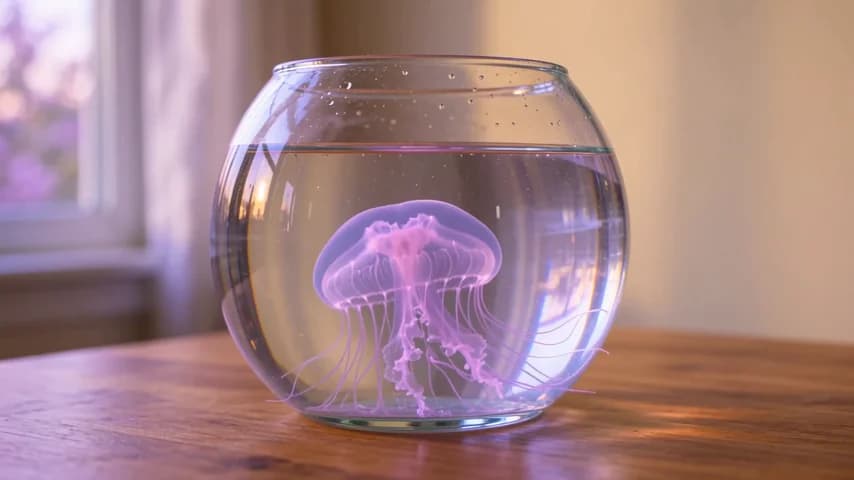
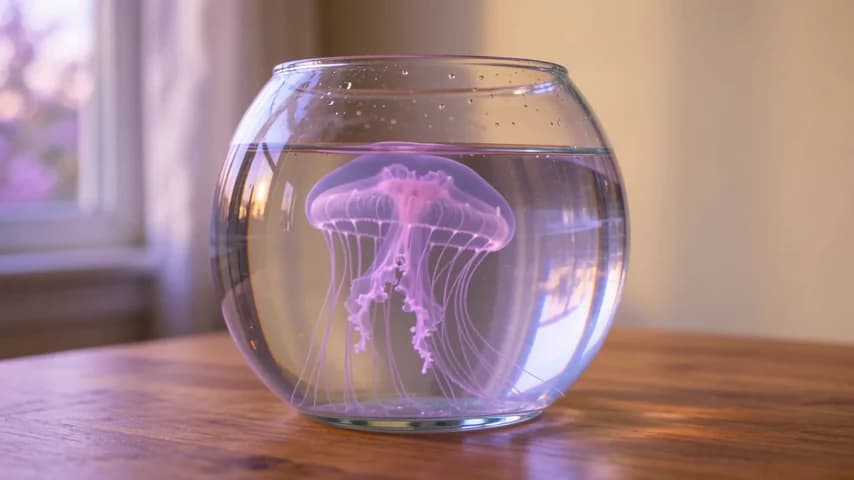
These illustrations were generated with standard Wan 3.0. They are not Seedance outputs or a comparison of model quality.
Seedance 2.0 Mini uses its own live video-token rates. Per-second estimates assume 16:9 output at 24 fps; review the chosen duration and input material when budgeting your scene.
| Resolution | Reference video | Official price | Funny AI price | You save |
|---|---|---|---|---|
| 480p | No video | $0.0316 | 10% | |
| 480p | With video | $0.019 | 10% | |
| 720p | No video | $0.068 | 10% | |
| 720p | With video | $0.0408 | 10% |
Estimates use 16:9 output at 24 fps. Other aspect ratios and actual output dimensions can change the cost.
Without reference video, only output seconds count. With reference video, input and output seconds count; billable input time is at least two-thirds of the output duration, rounded up to a whole second.
Official comparison: BytePlus international on-demand pricing. Checked 2026-10-15. Funny AI prices refresh automatically.
Input and output video tokens determine the final cost. Failed requests are not charged.
Reference video adds input usage and a minimum threshold to Seedance 2.0 Mini. Audio has no separate rate tier, and the model name does not determine the cost of finishing a project. Check the current estimate for your actual request.
Seedance 2.0 Mini is a separate ByteDance video model for short scenes from text and media inputs. It supports clips from four to fifteen seconds, or automatic duration, with output at 480p or 720p. Generated sound is optional, so you can prepare a scene with audio or add your soundtrack in a later edit.
A quiet environmental detail is one brief to explore with Seedance 2.0 Mini: a curtain moving in window light, or a jellyfish drifting inside a fixed glass aquarium. Decide what should change and what should remain stable. That distinction gives you a useful way to judge the full clip before revising the prompt.
bytedance/seedance-2.0-miniSeedance 2.0 Mini accepts up to 9 reference images, 3 video clips and 3 audio clips. An audio reference must be accompanied by a reference image or video.
The settings below follow this model’s specification and the controls available on Funny AI. Check the integration guide for input requirements.
Describe the subject and its surroundings to Seedance 2.0 Mini, then add the movement. A concrete action makes it easier to decide whether the result fits the purpose of the shot.
Supply Seedance 2.0 Mini with a first frame when the opening composition matters. An optional last frame can describe the destination, keeping both endpoints within the same frame-based request.
Give Seedance 2.0 Mini separate examples of appearance, movement or sound in reference mode. Explain the role of each source and keep these inputs separate from the first/last-frame mode.
Generate sound with Seedance 2.0 Mini or choose silence for a later edit. Listen to the complete clip and check that the audio fits the timing you want to keep.
Use the Seedance 2.0 Mini Playground to choose the starting material and output settings. Check the current estimate and availability before submitting a generation.
Select the Seedance 2.0 Mini identifier in your app and keep the returned task ID. Changing another model’s resolution does not switch that request to Mini.
Explore a modest environmental movement with Seedance 2.0 Mini, such as fabric lifting or light passing over water. Keep the rest of the setting quiet so the finished shot has a clear visual focus.
Use Seedance 2.0 Mini to explore a background with room for text or interface elements you will add later. Review the entire take for changes that could distract from that overlay.
Try one scene with Seedance 2.0 Mini before expanding it into a sequence. Define what would make the clip useful, so the next request changes a specific part of the result rather than repeating an open-ended prompt.
Tell Seedance 2.0 Mini which subject or setting must remain recognizable. Use a reference or opening image when that visual direction is already available.
Give Seedance 2.0 Mini a single action or camera move with a purpose. Keep the first test small enough that the whole result can be judged against the brief.
Set the Seedance 2.0 Mini resolution and duration for your placement. Check the estimate after including any reference footage, since input video also affects usage.
Review Seedance 2.0 Mini for unwanted cuts, shape changes or distracting motion. Save the task and settings, then adjust the instruction that addresses the specific issue you found.
The Seedance 2.0 Mini API guide describes its input fields and media rules. Submit once and save the accepted task ID, then retrieve the same task for status and the completed clip. Resume checking that ID after an interrupted status request.
Integration guideSeedance 2.0 Mini and Fast share duration limits, output sizes and reference counts, with separate model identities and live rates. Compare the same brief at matching settings and consider how many usable clips each produces for your project.
| Model | Output options | Funny AI price |
|---|---|---|
| Seedance 2.0 Fast | 480p / 720p | From ≈$0.0506 / second · 16:9 |
| Seedance 2.0 Mini | 480p / 720p | From ≈$0.0316 / second · 16:9 |
Funny AI displays Seedance 2.0 Mini rates for the inputs you select, so the cost is tied to the request you are preparing.
Review Seedance 2.0 Mini in the Playground before moving the brief into code. Its API guide describes the same model and supported inputs.
Keep the Seedance 2.0 Mini task ID with the prompt for later review. Your application and Playground spend the same account balance.
The Seedance 2.0 Mini and Fast guide explains their shared output limits and reference rules, helping you plan a comparison of current costs and usable results.
Seedance 2.0 Fast vs Mini: compare the same briefNo. Seedance 2.0 Mini has its own identifier and rate table. Select it explicitly in the Playground or API request; lowering standard 2.0’s resolution changes that model’s settings rather than selecting Mini.
Seedance 2.0 Mini offers 480p or 720p, with an integer duration from four to fifteen seconds or automatic duration. Output is MP4 at 24 fps. The Playground begins with five seconds at 720p, which you can adjust around the action your scene needs.
No. Seedance 2.0 Mini frame mode is separate from the mixed reference collection. For reference audio, choose reference mode and include an image or video reference. Use a first frame and optional last frame when you want images to define the shot’s endpoints instead.
The cost of a Seedance 2.0 Mini project depends on duration, output size, reference-video usage and the number of generations you need. Compare current estimates for matching settings, then evaluate the usable results. A model’s name or token rate alone does not determine the final budget.
No. The five-second aquarium illustration was generated with standard Wan 3.0 at 480p, as its caption states. You can adapt that scene for Seedance 2.0 Mini, but the displayed clip is not evidence of Mini performance or a comparison with Fast.
Open Seedance 2.0 Mini in the Playground, choose a focused scene and review the estimate. Use its integration guide to bring those input choices into your application.
Specifications checked: · Official model page · Release announcement